SaveAs True: a Chrome extension for privacy-first image harvesting
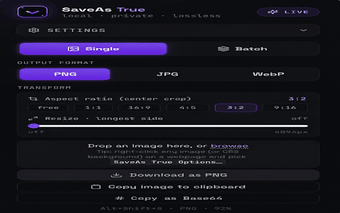
SaveAs True is a Chrome extension from saveas.true that harvests image assets locally for designers, developers, and researchers. It extracts visible and embedded graphics and converts them using the browser's HTML5 Canvas, offering format choices and manual download control. Key capabilities include detection of deep CSS background images, right-click capture of <picture> elements, and on-the-fly conversion to PNG, JPG, or WebP. Processing happens locally without external servers, keeping conversions on the user's device.
SaveAs True targets focused asset collection for web designers and researchers
The extension concentrates on image harvesting rather than broad download management, which suits workflows that require selective retrieval of page graphics. It can extract standard images and <picture> elements and detect deep CSS background images, so users who need hard-to-reach assets benefit most. Practical outcomes include grabbing high-quality visuals for mockups, documentation, or research without resorting to developer tools.
Local Canvas rendering keeps conversions immediate and browser‑side
The tool renders and converts images using HTML5 Canvas inside the browser, which removes any network round-trips for format changes. That design produces quick, on-device conversions to PNG, JPG, or WebP and avoids uploading assets to external services. Developers and designers who prefer processing without leaving their desktop see predictable response times tied to local CPU rather than remote latency.
Privacy is enforced by avoiding external servers and data collection
SaveAs True performs all harvesting and format conversion locally and includes no server communication, a fact that limits third-party exposure to harvested files. This model reduces the risk of transmitting sensitive images off-device, and the extension's architecture aligns with workflows that treat collected assets as private working files rather than shared resources.
The extension fits Chromium-based workflows but favors manual control
Designed for Google Chrome and compatible Chromium browsers such as Edge, Brave, and Vivaldi, the extension integrates into existing Chromium setups. Its workflow emphasizes user-driven saves and filename control rather than automated bulk scraping, so it integrates best where manual selection and destination choice are part of the workflow. Automation-oriented pipelines may need supplemental tooling to process multiple files.
A practical choice for hands-on asset capture, with a deliberate trade-off
SaveAs True is a practical option for professionals who prefer manual, device-resident asset capture during design or research sessions; the extension's architecture keeps processing local and limits external exposure. For teams that require automated, large-scale scraping or cross-device sync, the extension's manual workflow and Chromium-only scope represent clear trade-offs. Tip: use it as a controlled step inside a larger, local file-organization routine.